Observe
People, traffic, queues and visible activities from validated camera zones.
Understand how your cameras, network and software support the way your business operates—and what you need before adding AI and automation.
Discuss your business Try the readiness exampleFor bars, restaurants, retail, offices and other commercial sites.
 Systems integration

ASI360 connects supported Luminys camera technology with the information your business needs to make decisions. The objective comes first. Capture, analysis and reporting serve that goal.
Video, supported audio and timestamped events.
Apply supported search, counting and zone rules.
Organize validated events into useful trends and exceptions.
Combine approved operational data with context for decisions.
Track response, review time, service flow and the agreed outcome.
Continue to ASI360 AI Review →
Business goal → capture → analysis → information → decision → measured result.
Automate routine event handling and report assembly where supported. Give staff useful exceptions to review, rather than asking them to watch every minute of footage.
Explore the operational use cases →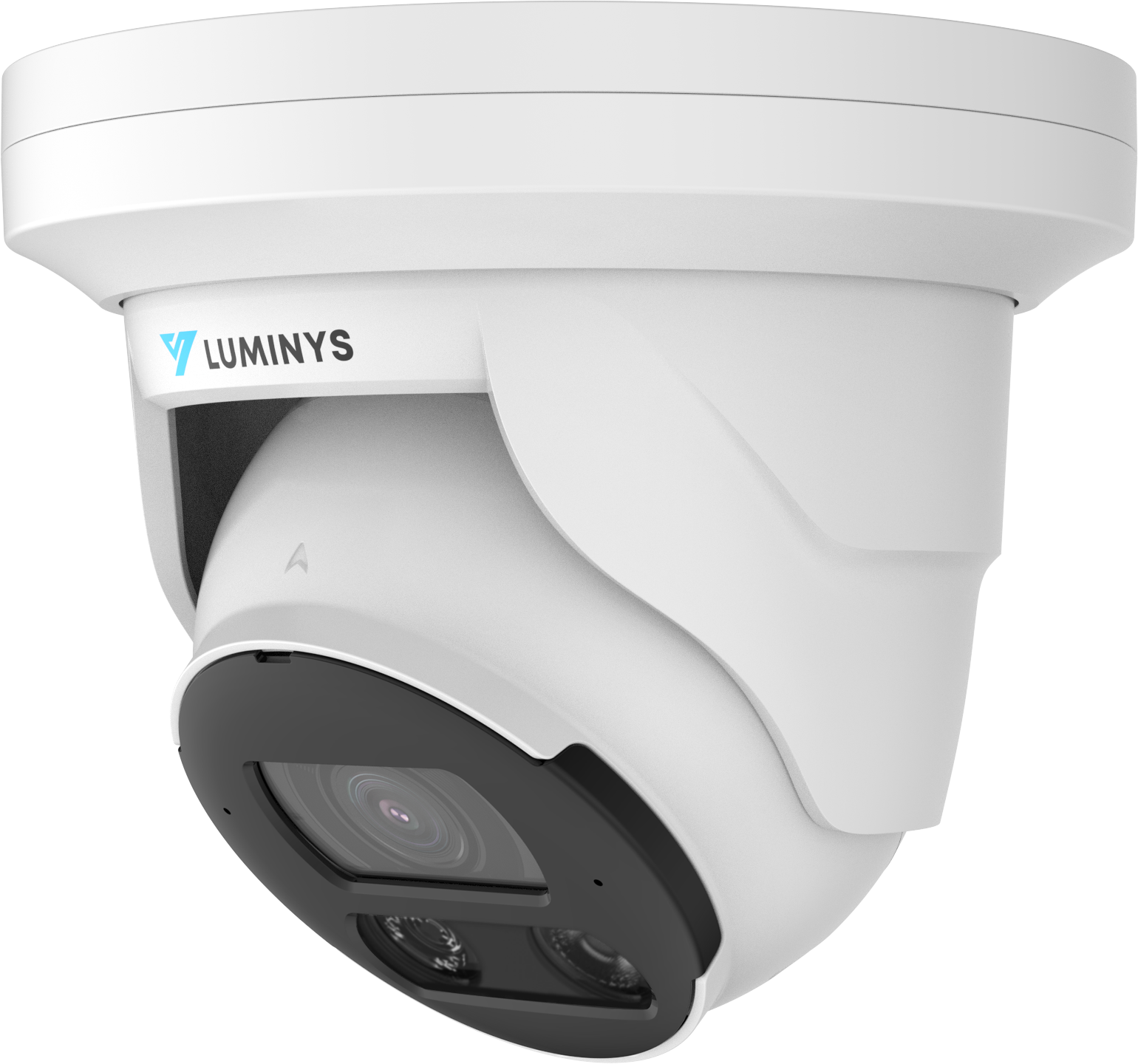
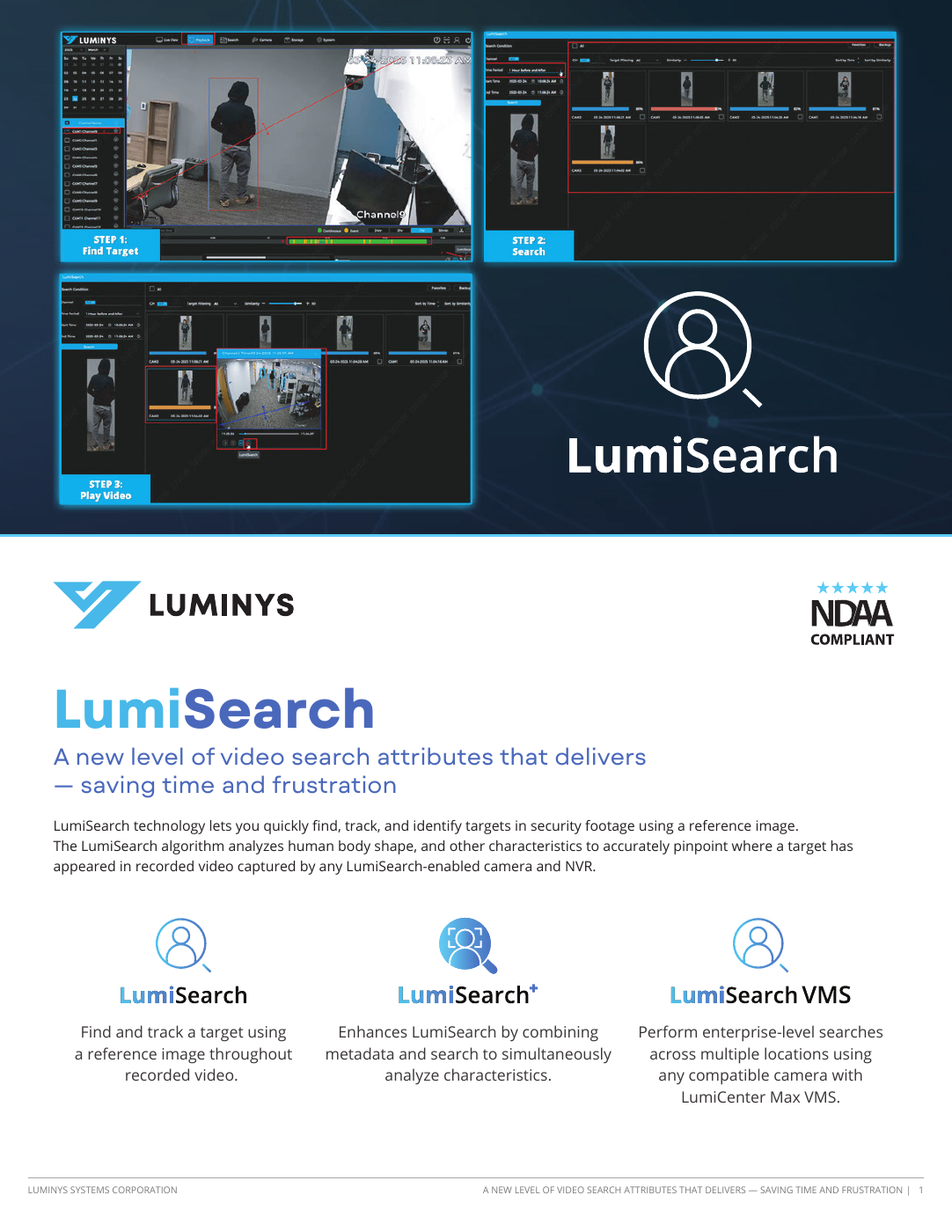
LumiSearch uses a reference image and body-shape matching to find candidate appearances in compatible recorded video. LumiSearch+ adds search attributes and metadata. Staff review the results and context.
Business goal: reduce routine footage-review time while preserving useful evidence. Actual time savings must be measured on the installed system.
People search is not verified identity or facial recognition. Compatibility, recording quality, lighting and integration affect results.
View the original Luminys flyer · Manufacturer feature referenceOriginal ASI360 and Luminys logos, manufacturer product images and saved partner-library flyer. Features are model-specific; product images do not establish capabilities on an existing installation.
Three aligned rows show the technology progression, the CAPEX foundation and the OPEX workflow. Stages 1–3 emphasize recorded evidence; stage 4 adds Luminys active deterrence; stage 5 joins validated data with goals, metrics and reports.
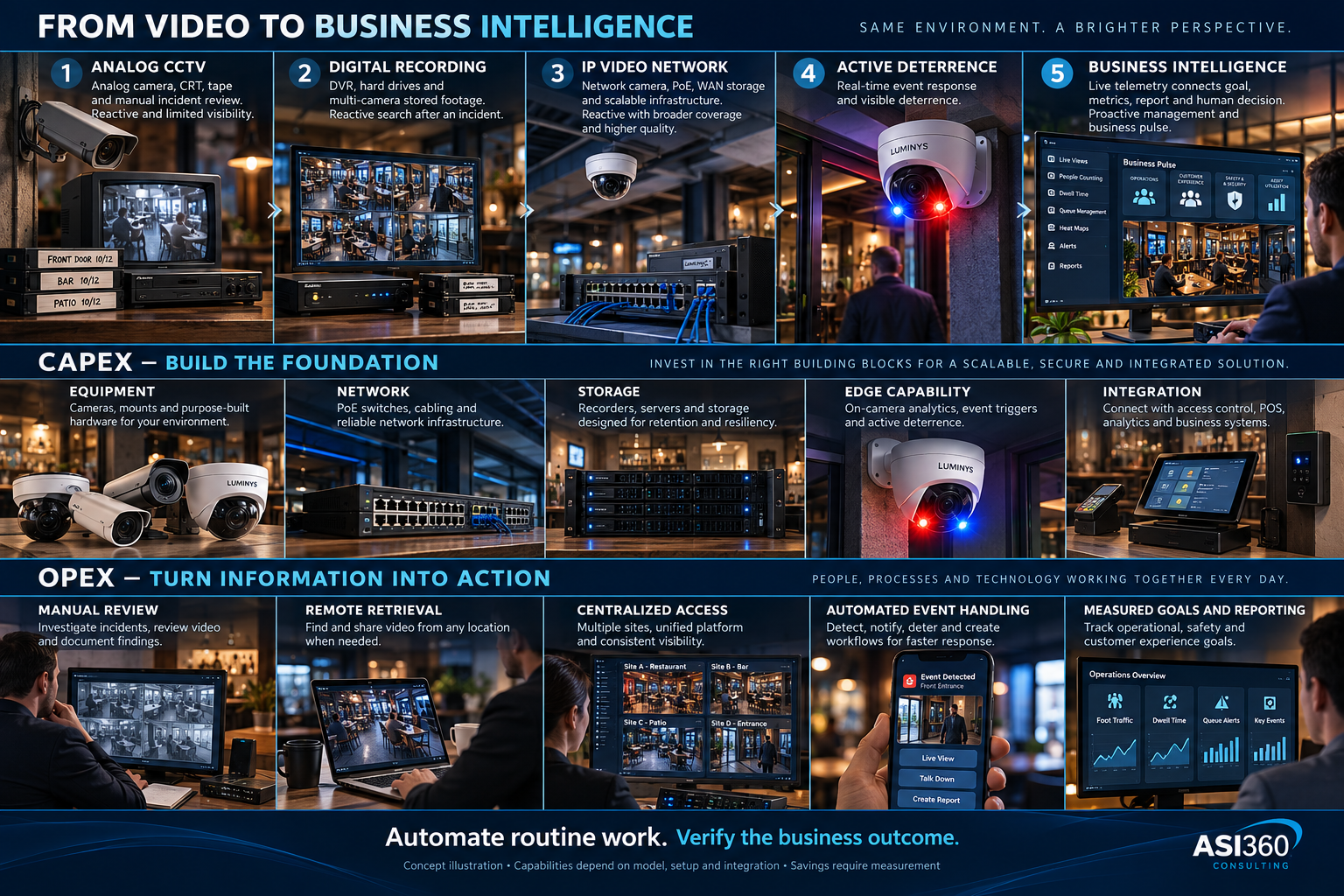
AI-generated educational illustration, not actual product photography or a live dashboard. Original partner logos and product images appear in the section above. Open full-size timeline.
CAPEX: cameras, protected installation, network, storage and integration. OPEX: support, monitoring, subscriptions and human review—offset only by measured benefits. Automated collection, routing and report assembly can release routine work; released time is not automatically cash savings.
“Proactive business intelligence” describes the stage-five operating model. Earlier systems may also alert and respond automatically. Active deterrence supports the response plan; it does not replace trained staff or guarantee incident prevention. Response time must be measured from event to alert, acknowledgment and action.
Connect the timeline to business goals and customer feedback →
Connect supported camera events with approved order, inventory, sales and equipment data. ASI360 AI Review can help assemble evidence, identify exceptions and draft reports against your business goals. Availability depends on the data sources and integrations commissioned for your business.
People, traffic, queues and visible activities from validated camera zones.
Order IDs, POS events, inventory records, equipment timers and sensor readings.
Compare timestamped evidence with an approved process and flag gaps or deviations.
Staff confirm findings, decide the response and track the outcome.
A useful timeline connects order received → preparation started → fryer cycle started → cycle ended → required check recorded → pickup → handoff. A visible basket movement can suggest an event; an equipment timer or verified operator entry provides a stronger cycle record. One basket may serve several orders, so batch-to-order mapping is necessary.
| Question | Required evidence | What remains unknown without it |
|---|---|---|
| How long was this batch cooked? | Basket/equipment ID, synchronized start/stop timer or validated equipment event, recipe version. | Exact cycle duration and whether it followed the approved recipe. |
| Which customer order did it serve? | POS/KDS order ID linked to the batch, split portions and handoff. | Order-level attribution; a camera view alone cannot reliably establish it. |
| Was a temperature check completed? | Appropriate calibrated probe or validated process-specific sensor, measurement location, timestamp and operator/check record. | Internal food temperature and food-safety compliance. |
| Where is the delay? | Order, preparation, cycle, pickup and handoff events with known clock alignment. | Whether delay occurred in cooking, staging, service or missing data. |
Thermal imaging: a suitable radiometric camera may screen surface-temperature patterns under validated conditions. Ordinary infrared night vision is not a temperature sensor. Thermal imagery does not establish internal food temperature and does not replace appropriate probe measurements or the approved food-safety process. FDA Food Code reference.
No universal cooking duration is assumed. An early cycle end should trigger review against the approved process, not an automatic conclusion that food is safe or unsafe. Missing events, unclear images and uncertain order matches stay unknown.
Business goals: reduce time assembling reports, understand service delays, reconcile inventory and sales, and surface process exceptions with supporting evidence. These are proposed workflows—not a claim that your existing cameras already provide these measurements.
Discuss an AI Review assessmentConnect observations, customer input and operational records. Review what happened, understand the context, act on the exception and measure the result. The goals are speed, efficiency and accuracy—with evidence behind each report.
Supported video events, order timestamps, sensor readings and voluntary customer feedback.
ASI360 AI Review organizes signals by zone, time, order and issue, with confidence and missing data visible.
An authorized person reviews the issue, assigns the next action and communicates with the customer when appropriate.
Compare delivery time, response time, order accuracy and feedback with the agreed baseline and goal.
| Business question | Capture and connection | Review panel and goal |
|---|---|---|
| Was the guest greeted and helped? | Voluntary rating/comment, service acknowledgment and order events. Audio analysis only where authorized and appropriately disclosed. | Feedback themes, response time and service follow-up. Do not infer customer sentiment from facial appearance. |
| Was the ID-check process followed? | Dedicated interaction view plus an approved reader/check acknowledgment where available; link by time and zone with restricted access. | Flag a missing process record for staff review. Video does not prove document authenticity, legal age or that a check was performed correctly. |
| Is the order ready and consistent? | Recipe-specific timer, order/batch mapping, appropriate temperature measurement and optionally a validated color-quality inspection. | Flag a quality or process exception. Color varies with food, lighting and recipe; it does not establish doneness or food safety. Staff follow the approved process rather than an automatic “cook more” command. |
| What is happening in the kitchen? | Validated zone-entry counts and refrigeration-door contacts; synchronize with relevant equipment and temperature logs. | Review traffic and door-open duration, workflow congestion and storage exceptions. A door opening alone does not establish inventory removal or employee misconduct. |
| Where did the stock go? | POS sales, recipes, deliveries, waste, transfers and physical counts; add approved scales or sensors if justified. | Reconciliation and variance for review. Inventory accuracy depends on these source records; camera observations are supporting evidence. |
| Did the order reach the correct zone on time? | Seat/table QR code → zone ID → order ID → kitchen ready → pickup → delivery confirmation. | Order-to-delivery and ready-to-delivery intervals by zone; missing handoff or delivery records stay unknown. |
Proposed tablets or QR links let guests submit a complaint, suggestion, recommendation or voluntary 1–5 rating. Ask for the zone/table and optional order reference so staff can investigate the correct experience.
Provide a private submission flow, accessible controls, a clear acknowledgment and optional contact details for a reply. Keep private feedback separate from public-review publishing.
Proposed table or zone ordering carries the location through checkout, preparation and delivery. Staff confirm the handoff; the review panel connects timing to that order and location.
A seating map, POS/order integration, stable identifiers and reliable timestamps are required. Cameras do not supply those order records automatically.
Issue workflow: received → acknowledged → assessed → assigned → action reviewed → resolved → outcome checked.
These are proposed integration workflows, not active monitoring or verified capabilities of an existing installation. Use minimum necessary identifiers and agreed retention/access controls. Pseudonymous event IDs are not a guarantee of anonymity when linked to footage, orders or contact details. Social-channel inventory connections, including Facebook/Meta, require a defined supported source and remain unverified.
Plan your business feedback loopBusiness-type integration guideCamera events, business records and voluntary feedback contribute different evidence. We validate the sources, define a workflow and show what remains unknown before recommending implementation.
Costs: hardware + mounting/network + integration + testing + recurring licenses/support. Business-type selection is a guide, not a product recommendation, fixed price or live assessment.
Request a scoped integration assessment →View six photorealistic department infographic pages →
Move from incident-only review to an evidence-backed brief against business goals. The reporting window, sources, freshness and missing data belong at the top of every report.
| Stage | Morning output | Limits / required evidence |
|---|---|---|
| 1 · Analog CCTV | No automated business report assumed | Manual incident notes and available footage; health/retention unknown without additional instrumentation. |
| 2 · Digital recording | Generic recorder report where supported | Video loss, disk warnings and motion events only when logged/exported. Events are triggers, not proven incidents. |
| 3 · IP video network | Device, stream and recording health | Reachability, sampled stream rate, storage retention, timestamp quality and supported event counts. Native device/NVR metrics vary; exact recorded/overwritten frame counts may be unavailable. |
| 4 · Active deterrence | Security event and response summary | Rule trigger → clip → audio/light output → notification → acknowledgment → resolution, only where each step is logged. Distinguish commanded output from verified playback or outcome. |
| 5 · Business intelligence | Goals, operations and outcomes | Join validated zone events with POS/KDS, staff records, timers, sensors and voluntary feedback; expose confidence, missing data and next actions. |
Service flow, confirmed deliveries, voluntary customer feedback, validated cleaning turnaround, source-backed inventory variance and a prioritized action queue. Compare each result with its goal and show sample size, confidence and missing events.
“30 confirmed deliveries; 22 returning and 3 first-time loyalty participants.” These are fictional examples. Visit history requires opt-in loyalty records; cameras do not establish customer identity or repeat visits by default.
Flag a missed table-ready target, review a process exception, or compare aggregate activity with an approved music/event timeline. A correlation is not proof of cause; a camera observation is not a verified accusation or food-safety result.
All examples are illustrative. No live nightly report or delivery schedule is active. ONVIF provides supported device/metadata interfaces; business metrics require the relevant POS, timer, sensor, feedback and staff-workflow integrations.
Sources: ONVIF Profile M · ONVIF Profile G. Exact frame/overwrite counters and device-health fields vary by recorder and API.
Stages 1–3 emphasize recording and retrospective review. Stage 4 adds automated event response and visible deterrence. Stage 5 joins supported events with business goals, metrics and workflows so management can act on trends and exceptions.
This is an educational maturity model, not a claim that earlier systems cannot alert or act proactively. Active deterrence supports staff and an agreed response plan; it does not replace a security guard or guarantee prevention.
Fund the camera, optics, lighting, protected connections, network, storage and implementation needed for the objective. Add edge analytics and integrations where they have a defined use. Reuse serviceable infrastructure after testing.
Decision: what evidence or workflow becomes possible, at what installed cost and expected service life?
Automate supported event capture, filtering, deduplication, routing and report assembly. Staff review exceptions and approve consequential actions. Include support, storage, subscriptions, tuning and review time in operating costs.
Decision: do measured hours released, cash savings and contribution exceed recurring costs? Released time is not automatically a payroll saving.
| Layer | What happens | Response measure |
|---|---|---|
| Traditional alarm | A configured sensor event enters a notification or monitoring workflow; video verification depends on integration. | Event → received → acknowledged → response |
| Luminys active deterrence | A supported camera rule can trigger configured lights/audio and an alert; authorized staff may use supported talk-down. | Event → local output / notification → human action |
| Business intelligence | Validated events join goals, time windows and approved operational data to produce reports and exception workflows. | Goal baseline → signal → decision → measured outcome |
No fixed response-time or labor-reduction claim is made before testing the installed system. Stage 5 pricing requires the agreed camera count, data sources, retention, reporting frequency and service coverage.
Each stage can improve the information available to your business. The return depends on what you measure, which decisions change and whether the benefit exceeds equipment, implementation and ongoing service costs.
CAPEX / implementation
Camera, recorder and maintenance.
OPEX / operating effect
Manual footage review and incident follow-up.
Information and value
Recorded evidence; establish current review time.
CAPEX / implementation
Network, storage and reliable access.
OPEX / operating effect
Remote retrieval may reduce travel and searching; support/storage costs remain.
Information and value
Retrieve evidence and measure downtime and review time.
CAPEX / implementation
IP cameras, PoE, edge/central storage and secure network access.
OPEX / operating effect
Central access can simplify retrieval; include bandwidth, storage and support.
Information and value
Distributed video and optional onboard storage; scalability depends on network and recorder design.
CAPEX / implementation
Luminys deterrent camera, supported audio/lighting, alert integration and commissioning.
OPEX / operating effect
Automated local event outputs may shorten routine handling; test false alerts and escalation.
Information and value
Rule-triggered audio/light response and timestamped evidence; verify the installed response path.
CAPEX / implementation
Business-data connections, dashboards and optional automation.
OPEX / operating effect
Ongoing service costs weighed against verified savings and contribution.
Information and value
Measure service flow, campaign results, waste and operational outcomes.
CAPEX and OPEX labels are planning categories here; accounting treatment depends on the purchase and service arrangement. New capabilities can add ongoing costs as well as create savings.
| Value stream | Baseline to capture | What counts as a result |
|---|---|---|
| Staff and management time | Hours spent reviewing footage, assembling reports and following up | Measured hours released. Cash savings require an actual spending reduction; redeployed time is capacity, not automatically cash. |
| Inventory and business flow | Purchases, POS items, inventory adjustments, waste and event timestamps | Verified reductions in exceptions or improved flow, with duplicate benefits removed. |
| Sales and demand | Traffic, conversion, event/campaign dates and POS transactions | Incremental sales supported by comparable periods or a controlled pilot; use contribution margin to estimate financial benefit. |
| Equipment and recovery | Replacement plan, outages, travel and support costs | Documented avoided costs or lower total cost of ownership; do not assume every upgrade reduces CAPEX. |
Explore 10%, 20%, 30% or up to 50% changes in a defined workload or cost pool. These are adjustable hypotheses, not ASI360 performance claims. A camera upgrade alone does not establish a reduction in total labor costs or an increase in sales.
Cash savings = addressable cost × assumed reduction × cash realization. Sales contribution = annual sales × assumed uplift × contribution margin. Annual net benefit = cash savings + sales contribution − added annual OPEX. First-year net also subtracts setup. Payback = setup ÷ annual net benefit × 12 months when annual net benefit is positive. Benefit multiple and ROI compare first-year benefits with setup + added annual OPEX.
Prove the scenario before expanding. Establish a baseline → run a scoped pilot → validate accuracy and outcomes → approve the investment → monitor results. Calendar, seasonality, operating hours and staffing changes affect comparisons. No revenue, savings or payback is guaranteed.
Discuss a measurable pilotLuminys, part of Foxlink Group, publishes an analytics portfolio covering counting, queues, heat maps, face detection, object detection and tracking. ASI360 connects the right supported features to your operating goals, then verifies the results on site.
Portfolio capability is not proof of capability on an installed camera. Model, firmware, recorder, licensing, placement and available data must be checked. Gray items below require validation or integration.
Compare arrival patterns and queue conditions by hour and day. Use validated demand data to plan staffing and investigate delays.
Attendance requires a separate approved timeclock or access-control integration. Face detection does not identify an employee or establish clock-in / clock-out.
Study activity zones and movement to propose better signage locations and coverage. Test whether a display changes behavior rather than assuming views become sales.
Signage triggers and sales attribution require integration and a measured pilot. Tracking does not guarantee uninterrupted identification across cameras.
Define seated, departed, cleared and ready states for each table. Measure departure-to-ready time separately from the guest’s seated duration. Join approved POS or order events when measuring service speed.
Native table-state analytics are unverified. Occlusion, groups and lighting must be tested; entrance counts alone cannot establish individual visit duration.
Assess whether a supported rule can flag a left or removed object in a defined zone. Specify the object, observation period, recipient and response before enabling alerts.
Exact abandoned / missing-object rules, timing and availability remain model-specific. An empty table is not automatically an abandoned-object event.
Add a dedicated view of the customer–staff interaction, with controlled lighting and a tested face-detail angle. Preserve a separate entrance overview so the interaction camera does not create a coverage gap.
If document authentication is required, specify a dedicated ID reader and authorized review process. Visible, infrared or UV checks depend on that reader’s supported functions; camera IR illumination alone does not authenticate a document or determine legal age.
Objective → supported device and rule → zone and lighting → timestamped event → approved business-data link → human sample check → dashboard metric → action and measured outcome.
For dwell and turnover, record the event definition, sample count, observation window, missing data and confidence. Missing evidence stays unknown. Labor savings and revenue effects require a baseline and measured follow-up.
LumiSearch uses reference-image body-shape search; Luminys explicitly distinguishes it from facial recognition. Do not treat search matches as verified identity.
Manufacturer references: LumiAnalytics and LumiTracking · Restaurant applications and queues · Luminys / Foxlink. Reviewed October 27, 2026. Business workflows above are ASI360 planning recommendations, not verified functions of every product.
Plan your analytics assessmentVideo is available for manual review. Device health and business context may be limited.
Connected equipment provides some useful signals, with gaps in setup, testing or data integration.
Validated observations, tested response workflows and approved integrations support measurable goals.
Choose a business type and describe what you know. Unknown answers stay gray. This self-assessment illustrates the framework; a verified score requires evidence and site review.
Answer the areas you know to see a provisional range.
A 50% readiness result does not mean a business operates at 50% capacity. Capacity needs an approved limit, usable space and validated observations.
Outdoor assessment separates approved capacity, usable capacity and observed utilization.
A location-by-location view of coverage, hardware, recording and supported capabilities, with unknowns identified.
Recommended repairs, commissioning and integrations, separated into practical phases with approval checkpoints.
Goals, baseline metrics and acceptance tests before broader automation or investment.
Tell us what you operate and what you want to improve. ASI360 will follow up to discuss scope and pricing.
This public page does not connect to your devices. A scoped assessment uses authorized access and agreed collection limits.
No. Exact model, firmware, licenses, placement and configuration determine what works. People detection is not the same as validated counting.
Those outcomes usually require POS, inventory or other business data. Camera observations can add context; they do not replace the underlying records.
Monitoring, reporting, retention and support are scoped separately. This page illustrates a future dashboard rather than a live service.