See the approach
Cover the storefront, patio, and service door with distinct views.

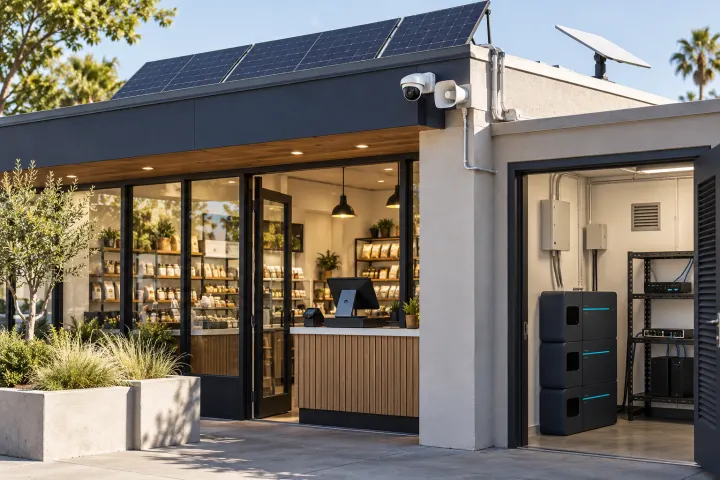
ERX360 Business Emergency Platform
See what triggered an alert, speak to someone at the perimeter from a safe location, and keep local recording powered through an outage.
Request a site quoteKeep a clear view of your entrance, patio and service door. Plan wired recording, configured warnings and backup power around how your team opens, closes and responds.
This is a site-configured package. Your written quote confirms equipment models, quantities, installation work and service scope before you order.
Review customer entrances, the closing route, delivery access, lighting, neighboring properties and the existing network. Agree who receives alerts and who can speak remotely.
The assessment scope covers a coverage plan, equipment and compatibility review, cable and mounting requirements, and a priority-load power plan. Confirm the assessment fee and deliverables in your quote.
Confirm installation, configuration and commissioning as line items in the quote. Acceptance checks should cover camera views, local recording and playback, configured warnings, authorized remote access, and power transfer and restart.
Agree equipment documentation, operator training and recovery steps at handover. Battery runtime is checked against the agreed load and test conditions.
Solar recharge, extended battery capacity, Starlink hardware and service, and analytics beyond the selected camera and recorder capabilities.
Ongoing monitoring, internet subscriptions, maintenance and recurring support require a separate agreement. Remote viewing and live talk-down require a working connection and an available authorized operator.
Request this kit’s assessment and quote · Estimate battery runtime
The storefront, patio, and delivery door need separate views. Wi-Fi disruptions and power outages can interrupt those views when your team needs them.
How ERX360 helps. Wire the priority cameras to a local recorder, add configured warnings or talk-down, and back up the cameras, switch, and recorder as a system.
Cover the storefront, patio, and service door with distinct views.
Review an event and use preset warnings or live talk-down on compatible equipment.
Protect the recorder and PoE switch with backup power sized to the measured load.
Know which zone triggered an alert.
Set schedules, warning messages, and who receives notifications.
Give staff a way to communicate without going outside.
Use illumination modes appropriate to the camera and site.
Use supported search tools and confirm returned footage.
Record while the internet is down, as long as the equipment has power.
Flag a configured boundary crossing and review the entrance view.
Play a preset notice when a qualifying rule triggers.
Use talk-down to direct a driver to the receiving door.
Review activity near the entrance from a designated camera view.
Send a zone-specific alert for staff review.
Test event lighting and verify that details are visible.
Search supported metadata, then confirm the clip and timestamp.
Keep wired cameras recording locally while the system is powered.
Back up the priority cameras, PoE switch, and recorder with a sized battery.
Simulated event. Live talk-down requires a working connection and an available operator. Call 911 in an emergency.
Scope wired cameras, local recording, PoE, weather-rated mounts, talk-down, and battery or solar around your site. Starlink hardware and service are quoted separately.
Request a site quote · Estimate battery runtime